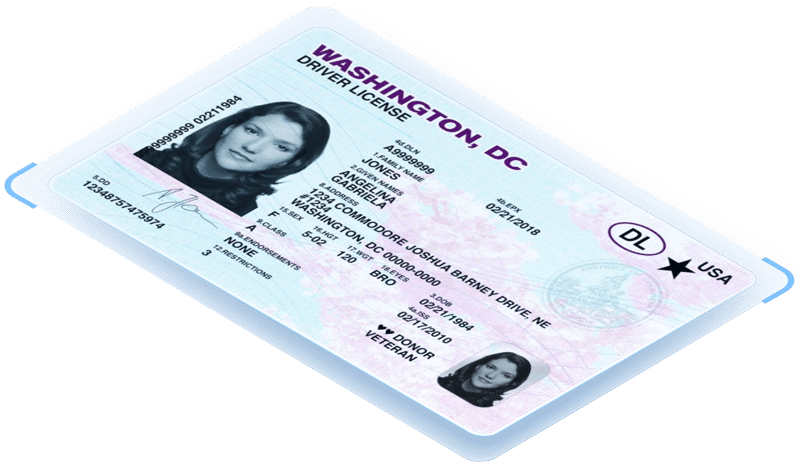

The Department of Defense Common Access Card (CAC) is a credential that includes printed visual elements, a 2D barcode, a contact/contactless smart-card chip that holds Public Key Infrastructure (PKI) certificates, and a number of security features. This comprehensive design means there are several valid ways to read a CAC, each with different capabilities and important legal and privacy limits. Here, we explain what’s on a CAC, which parts you can read with off-the-shelf tools, what you cannot or should not do, and how IDScan.net’s solutions can help businesses safely and responsibly automate legitimate CAC checks.
What are CACs typically used for?
Common Access Cards are primarily used by the US Department of Defense to establish trusted identity for active-duty service members, selected reserve, DoD civilian employees, and eligible contractors. In daily operations, CACs enable secure access to military installations and federal facilities, serve as the standard ID for in-person identity verification, and act as a smart credential for logging into DoD computers and networks. The embedded PKI certificates allow cardholders to authenticate to systems, digitally sign documents, and encrypt email, making the CAC a cornerstone of DoD physical and digital access control. Outside of DoD systems, CACs are sometimes accepted by private-sector businesses for varying purposes.
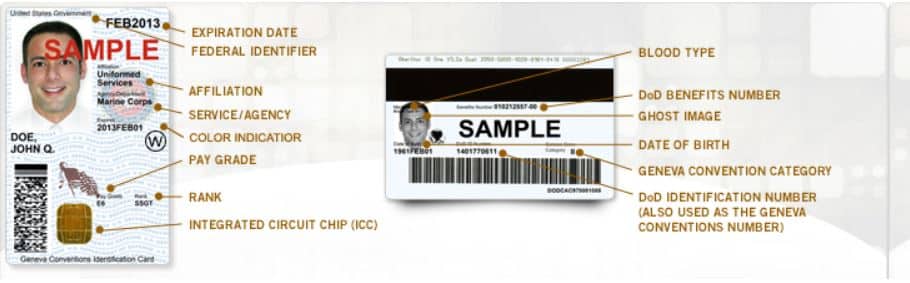
What’s on a CAC?
Written data on CACs
Visually, a CAC looks like a typical ID card: printed name, photo, printed expiration, and security features (holograms, microprint, etc.).
Barcode data on CACs
CACs, much like standard IDs, also contain a 2D barcode (PDF417) that encodes text data, but beyond that of a normal ID, including DoD ID number, and other structured fields.
Smartcard data on CACs
The CAC also acts as a smartcard that stores PKI certificates and other data accessible only via a compatible smartcard reader and the proper credentials/authorization.
These layers are intentionally complementary: the printed data is for quick human verification, the barcode is for automated capture of a subset of printed fields, and the chip is used for cryptographic authentication and access to DoD systems.
How to scan and verify Common Access Cards
If your goal is data capture (e.g., to pull name and DoD ID to fill a form) a modern ID scanner that reads PDF417 barcodes and can parse the barcode quickly is sufficient. PDF417 is widely used on government IDs, including state drivers licenses, and is typically indicated by dozens of characters and multiple fields when formatted for CACs. By contrast, reading the smartcard chip (to access PKI certificates or perform cryptographic authentication) requires specialized CAC/PIV ID scanners, plus appropriate permissions. Note this is not the same as reading a barcode and is subject to DoD technical and policy controls.
Legal and policy restrictions scanning CACs
Two important legal and policy restrictions shape how private businesses should treat CACs:
- Copying or reproducing government IDs can be unlawful. Federal law and DoD policy have historically warned against photocopying or reproducing certain U.S. government IDs; DoD communications and service guidance have repeatedly advised against photocopying CACs. That doesn’t mean every automated CAC scan is prohibited, but it does mean businesses must be careful about capturing images, storing full card scans, or reproducing card content without a lawful basis.
- CACs contain PIV/PKI assets that are intended for tightly controlled authentication. The CAC’s chip is designed to support authentication for DoD systems. Operations that attempt to extract or use private PKI credentials without proper authorization are both technically infeasible for third parties and against DoD policy; access to the chip is an enterprise/authentication action, not a consumer-ID check. DoD instructions and scanner requirements make the distinction clear: chip access is for authorized scanners and systems.
Because of those legal constraints, many private business verifications rely on the barcode or the printed visual features for a low-risk check, compliant ID checks, while leaving authentication of the card’s chip to DoD/authorized systems.
Practical CAC scanning restrictions and risk controls for businesses
If you decide to accept or scan CACs as part of a customer flow, for discounts, age verification checks, or on-site access, implementing specific rules can help ensure compliance.
- Prioritize barcode scans over image capture when possible. Reading the PDF417 barcode pulls structured data without creating a high-resolution image that could be reproduced. Many ID scanners and identity verification solutions, like VeriScan and ParseLink support PDF417 scanning and parsing while simultaneously mapping fields directly into an existing workflow.
- Avoid storing images of the CAC unless legally required. If an image must be stored (for fraud review or compliance), minimize retention, encrypt, log access, and retain only what you absolutely need. Follow applicable federal and state rules about handling PII by utilizing VeriScan’s customizable PII settings.
- Get explicit consent and a stated business purpose. Inform the cardholder what data you will capture, why, and how long it will be kept(based on state and federal regulations).
- Be mindful of the difference between reading and reproducing. A barcode scan that populates data for certain age verification or identity verification purposes is different from a photocopy or a printed reproduction of the full CAC. The latter can trigger legal and policy problems, while the former is legal.
How IDScan.net’s solutions fit into CAC workflows
Identity verification solutions, like VeriScan and ParseLink are designed around modern regulatory and technical realities. If your use case is to automate an eligibility check (for discounts, sign-in, or age/identity restricted services) while minimizing legal risk, implementing one of the aforementioned solutions is an easy way to improve existing workflows. Combined with customizable smartflows, businesses can accept CACs only for specified purposes (e.g., “military discount”), require affirmative consent, and enforce retention/deletion policies automatically in the workflow.
For businesses or government entities needing to authenticate CACs, IDScan.net’s ASDKs support PDF417 barcode decoding and template mapping so you can automatically extract name, DoD ID number, and other printable fields from the CAC barcode and push them into your application.
Selecting the appropriate ID scanner is also important when factoring in use cases and scanning restrictions. For barcode-only scans, a non-image capture ID scanner is the more appropriate choice. For businesses requiring CAC chip interactions (e.g., in a DoD partner environment), IDScan.net can integrate with approved smartcard readers that meet DoD reader specs. The DoD has published reader requirements and guidance that define the technical specs for readers that interact with CACs.
Conclusion
CACs are powerful credentials built to protect national security and the holder’s identity. For most private businesses, the safe, practical approach is to rely on the barcode and security features for eligibility checks, use purpose-built ID scanners and ID scanning software that avoid reproducing full card images, and implement strict retention and consent rules. If you need to go beyond visual or barcode checks (for example, to perform chip-based authentication), work directly with DoD channels and certified hardware that comply with the Department’s reader specifications and policy. IDScan.net’s ID scanning solutions and customizable PII settings are designed to help businesses automate the practical parts of CAC checks while reducing the legal and security risk of mishandling government ID data.